
Frontend & UI
high-end-visual-design
Blocks generic AI defaults and enforces agency-grade layout and motion.
What it is
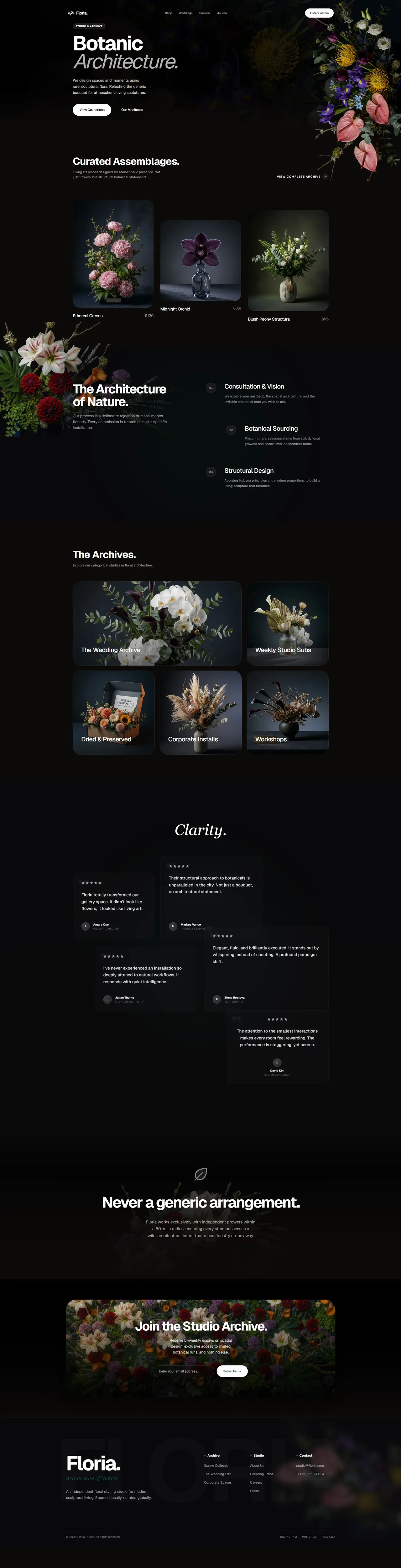
A directive skill that bans common AI design defaults, then forces the agent to pick one vibe archetype and one layout archetype before writing any UI code.
Teaches the AI to design like a high-end agency. Defines the exact fonts, spacing, shadows, card structures, and animations that make a website feel expensive. Blocks all the common defaults that make AI designs look che
Why it matters for design
- Inter, Roboto and thick Lucide icons are banned, so output stops looking templated.
- Cards get nested outer shell plus inner core, giving containers real machined depth.
- Section padding starts at py-24, so layouts breathe instead of crowding.
What it covers
- Absolute zero directive
- Creative variance engine
- Haptic micro-aesthetics
- Motion choreography
- Performance guardrails
- Pre-output checklist
How to install
high-end-visual-design
-
Clone the repo.
git clone https://github.com/Leonxlnx/taste-skill -
Point Codex at the skill file.
skills/soft-skill/SKILL.md -
Then describe the UI you want. Codex follows the skill.
How to run it with Codex
-
Ask Codex for a page; it silently rolls the variance engine first.
-
It scaffolds background texture and type scale, then builds double-bezel containers.
-
It injects custom cubic-bezier motion, then runs the pre-output checklist.
Every plugin here is free, open source, and links to its real upstream source.
More on the codex-design list ↗More Codex design plugins
 Frontend & UI What it does gpt-taste Builds award-style landing pages with GSAP scroll motion and gapless bento grids.
  Design Systems What it does Stitch Design Taste Writes a DESIGN.md that steers Google Stitch toward non-generic screens.
  Frontend & UI What it does image-to-code Generates design images first, analyzes them, then builds matching frontend code.
  Frontend & UI What it does imagegen-frontend-mobile Generates premium mobile app screen flows as images, not code.
 Next step
Design with Open Design, without the setup
Install this plugin yourself, or run a whole curated design layer around Codex with Open Design. Bring your own key, own your output.